User Manual
KIRIBAKO (Kiribako) — Bitterling & Small-Fish Fishing Log
KIRIBAKO is a fishing-log app for iPhone / iPad, specialized for Japanese freshwater small-fish fishing — bitterling, topmouth gudgeon, carp, crucian carp and more. Without exposing your fishing spots on social media, you can keep the delicate beauty of each catch on your device alone, "like placing a specimen in a paulownia box." This manual walks first-time users through the basics step by step.
Shoot
Photograph your catch from directly above. You can also record from photos you already have.
Choose
The on-device AI suggests species candidates. Measure the length too, if you like.
Keep
Save it, and the catch becomes a specimen. It is recorded inside your iPhone alone.
— That's all it takes. The chapters below explain everything in a little more detail.
1. Getting Started — What You'll Need
KIRIBAKO is free to start, and no account registration is required. Just install it from the App Store and you can begin right away.
- Supported devices: iPhone / iPad (iOS 15.1 or later)
- Account registration: Not required. Download it and start recording right away
- Trial period: The first 14 days let you try all features for free (no automatic charge)
2. Recording a Catch
When you land a fish, take a photo and record it. The steps are very simple.
- Open a new record with the "+" buttonFrom the add button on the home screen, start recording a new catch.
- Photograph the fishFrame the fish on screen and shoot. Shooting from directly above, in a bright spot, makes for a clean record. You can also pick a photo from your library.
- Check the species candidatesOnce you shoot, the on-device AI suggests species candidates from bitterling species and 8 species in total. All identification happens inside your iPhone alone, and your photo is never sent anywhere. Pick from the candidates, or correct it manually.
- Enter size, notes, and date/timeRecord the length (measured optionally; see the next chapter), a short note, the date and time of the catch, and more.
- SaveWhen you save, the catch settles into the paulownia box as a "specimen."
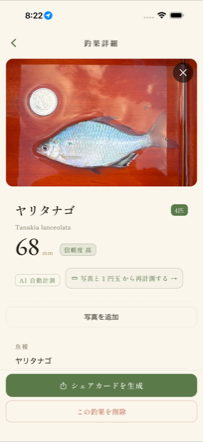
▲ The catch detail screen. Record each catch like a specimen.
- Shooting from directly above keeps the fish's shape undistorted and improves length-measurement accuracy
- Shoot in a bright spot, taking care that no shadows fall on it
- Keep the background as simple as possible. The fish stands out, and the AI's species identification is more stable too
- Handle the fish gently, and return it to the water promptly after shooting
3. Measuring Length
Even without a measuring tape, you can record an approximate length (fork length) from a photo. There are two measurement methods, selectable when you shoot. First, check which one suits you.
📷 Measure with a coin
Shoot a 1-yen coin or similar together with the fish, and measure using its size as a reference.
Good if you: want to use it on every iPhone / iPad · want an easy start
📏 Measure with LiDAR
The device sensor measures depth, so you can measure without a coin.
Good if you: have a Pro model and want to measure quickly without placing a coin (Takumi plan)
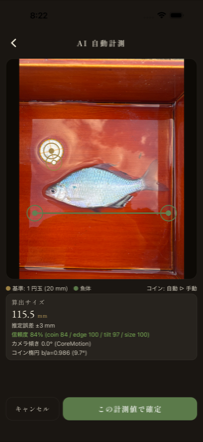
▲ The measurement screen. It estimates an approximate length from the reference.
Method A: Measurement using a coin as reference (📷 standard camera)
Just shoot a 1-yen coin (or a supported overseas coin) together with the fish. Using the coin's actual size as a reference, the app automatically estimates an approximate length from the image. It works on all supported devices.
- Shoot the fish and coin side by sidePlace a 1-yen coin next to the fish and shoot from directly above. Accuracy improves when the coin is at the same height (the same plane) as the fish.
- The coin is recognized automaticallyThe app finds the coin and uses it as the reference. If it isn't recognized well, you can adjust its position manually.
- Align the head and tail pointsAlign the measurement points to the tip of the fish's mouth and the tip of its tail, and the approximate length (mm) is displayed.
Method B: LiDAR coin-free measurement (📏)
This method measures without placing a coin, using the device's LiDAR sensor to gauge depth. When you select "📏 LiDAR capture" while shooting, depth information is captured along with the photo.
- Select "📏 LiDAR capture" when shootingChoose LiDAR on the capture-method sheet (switchable with the standard camera).
- Shoot from a distance of 20–40cmShoot from directly above, about 20–40cm from the fish. If you are too close (under 20cm), it won't focus and a warning appears. Note that zoom is unavailable during LiDAR capture (this is by design, to obtain depth).
- Align the head and tail pointsAlign the measurement points, and an approximate length based on depth is displayed. You can measure even without a coin.
- (Optional) Including a coin in the shot makes it even more accurateEven with LiDAR capture, if a coin is in the shot, it is used as a reference for correction, making the result more accurate. The coin is an optional accuracy boost that is "handy to have."
4. Looking Back on the Map
You can look back on your recorded catches on a map. Keep a record of when, where, and what you caught as your own private field map.
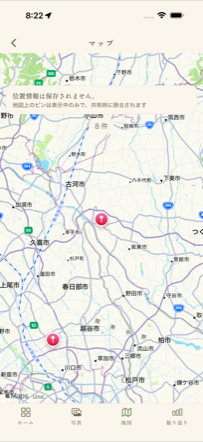
▲ The map screen. Your own private field map.
5. Sharing with Specimen Cards
Turn a favorite catch into a specimen-card-style image and share it to Instagram, X, Messages and more. Discreetly, but beautifully.
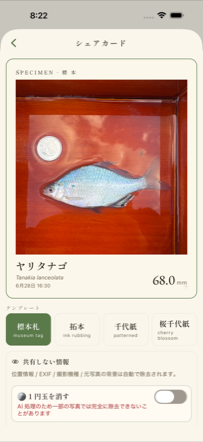
▲ The share screen. Export a specimen card.
- Choose Share from a catchCreate a share card from the detail screen of a recorded catch.
- Export the cardOnly a safe card image — with location and photographer info automatically removed — is exported.
- Share with any app you likeSend it to social media or messaging apps. It contains no information that could identify your fishing spot.
6. Frequently Asked Questions
Where are my photos and location data stored?
Everything is stored only inside your iPhone / iPad. There is no sending to the cloud, and no viewing by any third party, including us.
Does species identification require an internet connection?
No. Species estimation is completed entirely by the on-device AI, so it works offline. Your photos are never sent anywhere.
The LiDAR option isn't shown
LiDAR measurement is available only on the Takumi plan and on a LiDAR-equipped device (Pro models from iPhone 12 Pro onward / iPad Pro). On unsupported devices, the option is not shown. If your device has LiDAR, please check that you have subscribed to the Takumi plan.
How accurate are the measured values?
Measured values are only approximate, but the rough margins of error are as follows (including values based on real-device testing with an iPhone 15 Pro and a 100mm ruler).
- Coin-reference measurement: about ±3% (at minimum around ±2mm). For example, a length of 60mm is roughly ±2mm, and 100mm is roughly ±3mm.
- LiDAR coin-free measurement: about ±2% in real-device testing. Including a coin in the shot for calibration improves it further, to about ±1%.
Both vary with the shooting angle, perspective distortion, and how you align the measurement points (mouth tip and tail). Shooting from directly above, in a bright spot improves accuracy. These are approximate values; for uses that require accuracy — such as official records, competition records, or length determinations under fishing regulations — please use a dedicated measuring instrument.
Will my records be lost if I change devices?
Records are stored only inside your device. At present, there is not yet a feature to move (import) records to another device. CSV export is possible, but it is for saving the content of your records outside the device as a backup copy (photos are not included), and you cannot currently re-import an exported CSV into the app. Transferring between devices and cloud backup are items under future consideration. Until a transfer feature is provided, we recommend keeping the device that holds your records on hand.
How do I cancel?
You can cancel Takumi from your iPhone's "Settings" → Apple ID → Subscriptions. Even after canceling, you can always view your recorded catches.
What should I be careful about regarding protected species?
Some bitterling and related species fall under the Act on Conservation of Endangered Species as domestic rare wild fauna and flora, natural monuments, designated invasive alien species, and so on, for which capture, possession, and transport are prohibited or restricted by law. Please always check the relevant laws and fishing regulations, and do not capture protected species.
If You Run Into Trouble
If you have questions, bug reports, or requests, please feel free to get in touch. This is an app nurtured with care, one piece at a time, by a small team. Your voices are the strength that helps us keep each next catch more beautifully.